
Stylistic
Editorial suggestions you review in Word.
Stylistic turns analysis into Track Changes and comments in the document you are editing. Review each suggestion with the controls you already use in Word.
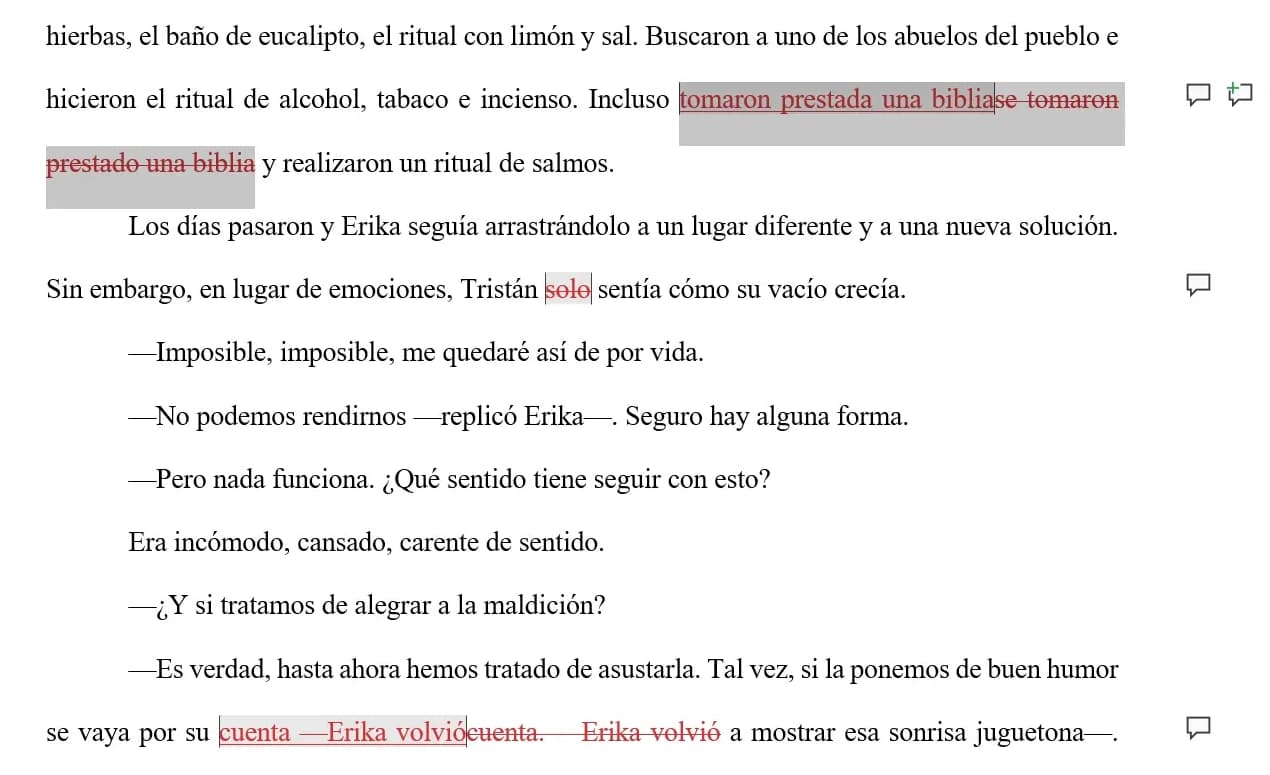
Read the reason, then decide each suggestion
Stylistic runs on the open document and writes its suggestions into Word. Each card carries the category it falls under, how severe it is and why it is proposing the change.
Use "Analizar y sugerir", then accept or reject any card and watch the revision resolve in the document.
Una tarde Alba recibió una llamada de Elena.
La última vez que recibió una llamada de ella fue cuando terminó encerrada
desde entonces y, a menos que Diego haya cumplido su farol de presentar una queja formal, no se le ocurría
justo en ese momento.
Alba caminaba sola por el exterior en ese momento, así que se desvió
Aceptó la llamada y escuchó un sonido estático.
Si lo hacía era porque sucedió algo importante, siendo el caso, la conclusión de Alba es que había pasado algo que requería su atención.
pensó Alba apartando la mirada al horizonte en llamas.
—Oye, y ¿qué pasó con esa investigación de Diego?
pero ninguno está relacionado con Diego, y tampoco se parecen al caso que tenemos con él. Es difícil trazar una conexión con tu caso, por lo tanto, es un camino sin salida.
—¿Y de qué se tratan esos incidentes?
escuchó a Elena reclamar del otro lado, pero entonces lo recordó, a la dueña de esa voz.
«ya intentó llevársela justo después del incidente».
—Y si dijera qué —Alba tragó saliva, podría estar equivocada, pero tenía que decirlo— Diego está intentando llevarse a una persona
Nadie hace nada…, incluida yo… ¿Qué sucedió con la Elena que siempre nos apoyaba cuando alguien de nosotros quería salvar a alguien?
—¡Paula no se habría detenido por algo como esto!
—Danos unas horas —respondió Marina y con una voz juguetona agregó—. No subestimes los recursos de los Salas, querida.
Veo que te has hecho unas amigas bastante interesantes. Dejádmelo a mí, yo misma hablaré con ese tanuki.
salió de la sombra en la que se encontraba, para darse cuenta de que el sol ya casi estaba por desaparecer.
Stylistic
Listo para revisar tu texto
Analizá el documento completo o seleccioná un fragmento para empezar.
Your editorial decisions stay reviewable
Stylistic expresses its suggestions through Word’s review features and checks where a suggestion belongs before placing it.
- 01
Changes remain visible in Word
Suggested replacements use Track Changes. Comments carry the reason for each suggestion, so you can review the proposed edit in the document.
- 02
Moved excerpts are checked before placement
Stylistic locates a suggestion by its context and then its anchor. If it cannot find the anchor, it reports the suggestion as not found.
- 03
Analysis begins with an authenticated connection
The add-in checks its backend connection and valid session before it begins analysis.
Set up a local editorial review
Start the backend from its documented setup.
Run the add-in, then open its task pane in Word.
Sign in, choose an analysis profile, and run Analizar y sugerir.
Run it from source
The repository READMEs provide the commands below.
- Stylistics BackendNode >= 22.13 · Bun · Docker
bun installcp .env.example .envdocker compose up -d postgresbun run devEnvironment- POSTGRES_URLThe local PostgreSQL database
- Google OAuthhttps://localhost:3000 as a trusted origin
- Stylistic add-inNode 18+ · Bun · Word 2019+ or Word Online
bun installbun run start
You may also like
 CLI · SPANISH ORTHOGRAPHY
dlexa
Normative Spanish from the terminal, one explicit route per kind of lookup.
Shares the normative Spanish language work.
 CLI · DEVELOPER TOOLING
dharness
A commit gate that owns the invocation and lets each tool’s exit code be the verdict.
Shares the staged-change quality gate discipline.

 LOCAL-FIRST · DESKTOP + MOBILE
Autoreas Bridge × Mobile
Two sibling apps keeping an 800+ series catalog in sync over your own LAN.
A sibling production surface that closes the loop.